Fruit Trees
Showing posts with label website. Show all posts

HowTo: Reset your password

1. Navigate to My Account and Wish List here: https://secure.daleysfruit.com.au/account/ the link can be found at the top of any page.
Figure: Click on My Account & Password
2. Click on Lost Password
Figure: Lost Password
3. Enter your email address
Figure: Entering your email address
4. Click on Reset Password
Figure: Confirms that an email has been sent to reset password
5. Open up your email and look the email with the subject "Password Reset"
Figure: Password reset email
6. Click on Reset Password
7. Enter a new Password and confirmation password and click Update Details
Figure: Updating Your New Password
8. Finished👌

You have now reset and updated your password and on this page you can see
  • Order History
  • Email/SMS me When Available
  • Forum Contributions
  • My Edible Contributions.


How to Place an Order Using a Computer or PC

1. Navigate to www.daleysfruit.com.au

How www.DaleysFruit.com.au will look

2. Finding Plants

Search Field
You can use the search feature up the top left near the logo.
Examples: "Man" This will bring up Mango and Mandarin or anything start with man. This is very helpful if you do not know the exact spelling just use the first 3 letters.

Every Plant in Stock
To the right of the screen is a large image "In Stock Now" Click it to see every plant in stock on one page.

Look for this image to see every plant in stock.
Every Plant in Stock

3. Adding to Cart

Change the qty to the amount that you like and click on "Add to Cart"
Adding to Cart

4. Shopping Basket and Freight Charges

On the line that says "Freight" is a box that says Enter Postcode enter your postcode then click on Update Changes
Enter your postcode to get freight calculations
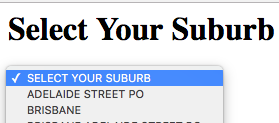
You will then need to choose your suburb from a list of suburbs from that postcode.
Select your suburb from the list
Pickup: On the freight line is a link "or Pickup at Nursery in Kyogle" ( Learn More )
Deliver to your address: Underneath the freight charges are all the different courier companies that can deliver the plants to your address. "Choose the freight company you know and trust" Often paying more for one you are happy with is the best option.
Choose your Freight company

5. Checkout

Choose your payment method and then click on the Checkout button
Choosing payment options and checkout
Fill in your Address and payment details and click "Finalise Order"
Address Details

6. Finished

When your order is finished you will get a message that looks like this:
Order completed
We send emails such as Dispatch notice, Track and trace emails to you so make sure you check your email for your order confirmation email.

    Redeeming Gift Vouchers at Daleys Fruit Tree Nursery

    Example Gift Voucher from Daleys Fruit Tree Nursery

    Redeeming Gift Vouchers

    If you have received a gift voucher and would like to redeem it on DaleysFruit.com.au firstly you need to add to cart plants that are in stock and ready to be sent which will create a shopping cart.

    Step 1: Adding plants to the Shopping Cart
    You can view Every Plant in Stock or you can use the search feature up the top of any page to search for the plant you would like to buy.
    Searching for mandarin via the Search Bar
    Clicking Add to Cart
    Step 2: Adding your Gift Voucher
    You will then have created a shopping cart and below the shopping cart is a box called "Offer or Voucher" in this box type your Gift voucher number and then click on Add
    Bottom of shopping cart is the space to enter your Gift Voucher
    Once you have added your voucher it will appear in the shopping cart and also tell you how much of the Voucher is left to use on another order.
    Successfully added to Cart and showing how much is left

    Pre Purchases and Gift Vouchers

    Plants that are available for Pre Purchase are not yet in stock and therefore can not be used with gift vouchers. If we are successful at propagating this plant we then send you an email to say it is ready to be send and give you the option to add extra plants to your order. At this stage you can click in the email to Add more plants and then add your gift voucher using the steps as shown above.

    Example email that you receive

    Full Gift Voucher FAQ

    Purchasing Gift Vouchers

    Daleys sells 2 different types of Gift vouchers you can give to your friends

    Howto: Reset your Password

    Step 1: Click on My Account & Wishlist up the top of any page

    Step 2: Click on Lost Password, Enter email address and click Reset Password
    Figure: Entering information to reset password

    Figure: Verification that email was sent
    Step 3: Open your email address and look for an email from Daleys Fruit Tree Nursery
    Figure: How your email will look
    Step 4: Click on Reset Password in the email and you will then be logged in to then reset your password.
    Figure: Click on Yes to Change your password
    Figure: Enter & Confirm your password and click Update Details

    Congratulations your password has then been reset